Snippets are reusable pieces of content that can be inserted into topics and automatically expanded when the documentation is generated. Similar in concept to variables, they allow you to manage shared content from a single location while ensuring consistency throughout the project.
They are especially useful in several situations:
- When the same content needs to be reused in multiple topics, avoiding duplication and simplifying maintenance;
- When drafting content: you can create and refine it as a snippet, insert it where needed, and later replace it with finalized content directly in the topic if required;
- When maintaining standardized content such as warnings, notes, legal disclaimers, or procedures that must remain consistent across the documentation;
- When managing content that may change frequently (for example, version-specific information or instructions), allowing quick updates in one place;
- When collaborating across a team, ensuring everyone uses the same approved wording and formatting for shared content.
Overview of the user interface
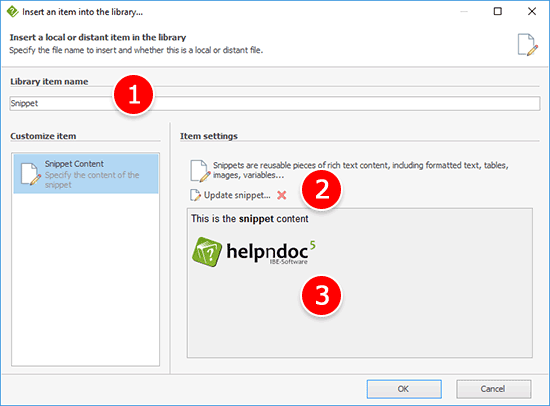
1. Library item name
Specify a unique name for the snippet within the library. This name is used to identify and reuse the snippet throughout the project.
2. Item type
Choose how the raw content should be provided:
- Snippet content: store the content directly in the HelpNDoc project.
- External File: load the content from an external file when the documentation is generated. This is useful when the content is maintained outside HelpNDoc or shared between projects.
3. Commands
The following commands are available for the snippet library item:
- Update snippet: Opens the snippet editor to modify the current content;
- Clear snippet content: Removes all content from the snippet.
4. Preview
Displays the current content of the snippet, allowing you to quickly review its contents without opening the editor.
Convert topic content to a snippet
You can quickly turn existing topic content into a reusable snippet, making it easy to maintain and reuse elsewhere in your documentation:
- Select the desired content in the topic editor
- Right-click the selection
- Click "Convert to snippet..."
HelpNDoc will then prompt you to choose how to proceed:
- Yes: Replace the selected content with the newly created snippet
- No: Keep the selected content unchanged and create a new snippet in the library
- Cancel: Abort the operation without creating a snippet
Insert snippet content into a topic
In addition to inserting a snippet as a reference, you can directly insert its content into the current topic. This places a copy of the snippet's content into the topic, which can then be edited independently. To do this:
- Select the desired snippet in the library
- In the Home ribbon tab, within the Library group, click the arrow next to Insert in topic
- Choose Insert content in topic
Alternatively, you can right-click the snippet in the library and select Insert in topic then click Insert content in topic from the context menu.
This approach is useful when you want to reuse existing content as a starting point but need to customize it for a specific topic without affecting the original snippet.