Ya tienes la última versión.
¡Felicidades!
Explora las diversas guías paso a paso para aprender más sobre el uso de HelpNDoc.
Hay una nueva versión disponible.
Descarga ahora la nueva actualización gratuita.
Explora las diversas guías paso a paso para aprender más sobre el uso de HelpNDoc.
Hay una nueva versión disponible.
Descárgala de la sección de clientes.
Explora las diversas guías paso a paso para aprender más sobre el uso de HelpNDoc.
Registro de cambios de la última versión
Versión 10.9.0.492 – Fecha de lanzamiento: sept 29, 2026
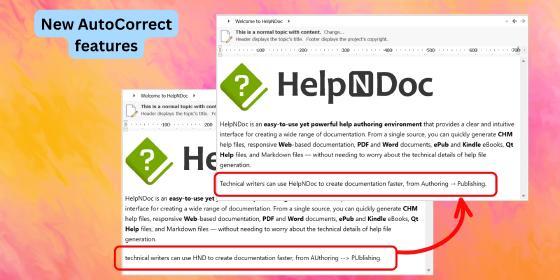
- New optional automatic capitalization of the first word in each sentence while typing
- Added correction of accidental double capitals at the beginning of words, with configurable exceptions
- Introduced customizable text shortcuts for symbols, emoticons, arrows, and common corrections
- Added an option to configure the number of heading levels displayed in the default HTML template's inline table of contents
- Hold the CTRL key while copying topic content as Markdown to exclude inline Base64 images, improving compatibility with AI systems
- Improved PDF generation performance, reliability, and compatibility across a wider range of PDF viewers
- Improved the generated PDF code used for embedding and managing build assets attached to PDF documents
- Enhanced text rendering, graphics drawing, and font embedding for higher-quality PDF document generation
- Improved the default HTML template's index popup to display the full topic hierarchy, making it easier to distinguish between topics with similar names
- Fixed an issue where the selected accent color was not applied consistently to all elements in the default HTML template, including some tabs and buttons
- Fixed an issue where some elements in the default HTML template remained light-colored when using a dark theme
- Improved the default HTML template's inline table of contents to be more compact, integrate better with other UI elements, and handle skipped or invalid heading hierarchies more gracefully
- Fixed an issue in the template editor that allowed the root "assets" folder to be deleted, preventing new assets from being created or imported into the template
- Improved the list editor for topic HTML aliases and template HTML tags, adding support for filtering, sorting, and inline item editing
- Reworked several icons to improve visibility, particularly when the application is used in dark mode
- Improve the built-in code editor with enhanced bracket highlighting and code selection
- Fixed an issue where the dynamic content editor did not support the Tab key for adjusting code indentation