The format you choose for your content, whether it’s a user manual, training guide, course workbook, nonfiction book, or internal company documentation, has a direct impact on how people read and use it. Two popular formats, PDF and ePub, seem similar at first glance because they both let you package and distribute written material. In practice, however, they offer very different reading experiences.
PDFs are fixed, precise, and professional, while ePubs are flexible, lightweight, and comfortable on many devices. One is ideal when layout matters. The other shines when readability and portability matter most.
So, which one should you choose? The answer depends on your audience, your content, and how your readers expect to use it. With HelpNDoc, though, you may not need to choose at all.
📄 PDF: Stable, Professional, and Print-Ready
PDF is often the first format people think of when they need to share a finished document, because it preserves layout, formatting, and visual structure with precision.
![Writer showing PDF document [pdf-document]](/news-and-articles/2026-05-12-epub-vs-pdf-choosing-the-right-format-for-your-content/images/woman-showing-pdf-document.jpg)
Because PDFs preserve the page exactly as designed, they are an excellent choice for content that must look the same everywhere. Printed manuals, professional reports, training handouts, reference guides, and formal documents can all benefit from PDF’s fixed layout.
PDFs are also familiar. Most users already know how to open, print, save, and share PDF files. For businesses, educators, trainers, and authors, this reliability is a major advantage. A PDF feels like a final, polished publication.
This format is especially useful when readers need to print the content, archive it, cite page numbers, or review a document exactly as it was designed.
⚠️ Where PDFs Can Be Less Convenient
PDF’s greatest strength can also become its main limitation. Because the page layout is fixed, PDF documents do not always adapt well to smaller screens.
On a phone or small tablet, for example, readers may need to zoom in, scroll sideways, or reposition the page constantly. This can make long reading sessions uncomfortable, especially for books, tutorials, course material, or guides meant to be read continuously.
PDFs are also less flexible when readers want to adjust the font size or personalize the reading experience. The document retains its original design, which is ideal for visual control but not necessarily for accessibility or reading comfort.
In short, PDFs are excellent when you want control over presentation. However, they are less ideal when you want the content to adapt to the reader.
📖 ePub: Flexible, Lightweight, and Reader-Friendly
ePub was designed for digital reading. Rather than preserving a fixed page layout, it allows the content to reflow based on the reader’s device, screen size, and preferences.
![Writer working on ePub document [epub-document]](/news-and-articles/2026-05-12-epub-vs-pdf-choosing-the-right-format-for-your-content/images/writer-working-on-epub-document.jpg)
Its ability to adapt to different screens and reading preferences makes ePub particularly useful for books, learning materials, tutorials, educational content, onboarding guides, and long-form documents. Readers can increase the font size, adjust the spacing, and change the display settings to read comfortably on phones, tablets, and eReaders.
This is a major benefit for teachers, trainers, authors, students, and content creators. ePub makes content feel less like a static document and more like a digital book that adapts to the reader.
It is also lightweight and portable, making it practical for distributing large amounts of reading material without forcing users to deal with heavy, print-oriented files.
⚠️ Where ePub Can Be Less Suitable
Because ePub adapts to the reading device, it does not offer the same level of layout control as PDF. That flexibility is usually an advantage, but it can create problems for certain types of content.
Complex tables, large diagrams, heavily designed pages, precise page references, and documents that rely on exact positioning may not translate as predictably to ePub. Additionally, different ePub readers can display the same file slightly differently.
This does not make ePub a weaker format. It simply means that it is built for a different purpose: ePub is best when the reading experience matters more than exact page design.
🧭 Choosing Between PDF and ePub
The best format depends on how your audience will use the content.
![ePub vs PDF [epub-vs-pdf] [Featured]](/news-and-articles/2026-05-12-epub-vs-pdf-choosing-the-right-format-for-your-content/images/epub-vs-pdf.jpg)
Use PDF when you need a polished document that can be printed, archived, reviewed, or shared exactly as designed. It is ideal for manuals, reports, official guides, reference documents, and any content where layout precision matters.
Use ePub when your readers are more likely to consume the content on phones, tablets, or eReaders. It is ideal for books, tutorials, course material, learning guides, and long-form content that should remain comfortable to read across different screen sizes.
In many cases, both formats are useful. For example, a teacher might provide a PDF workbook for printing and an ePub version for reading on tablets. A business might publish a PDF user manual for support teams and an ePub guide for customers who prefer mobile reading. An author might distribute a print-ready PDF alongside an eBook version.
The real question is not always “PDF or ePub?” It is often “Which format does each reader need?”
🚀 With HelpNDoc, You Can Generate Both
HelpNDoc eliminates the need to maintain separate projects for different formats.
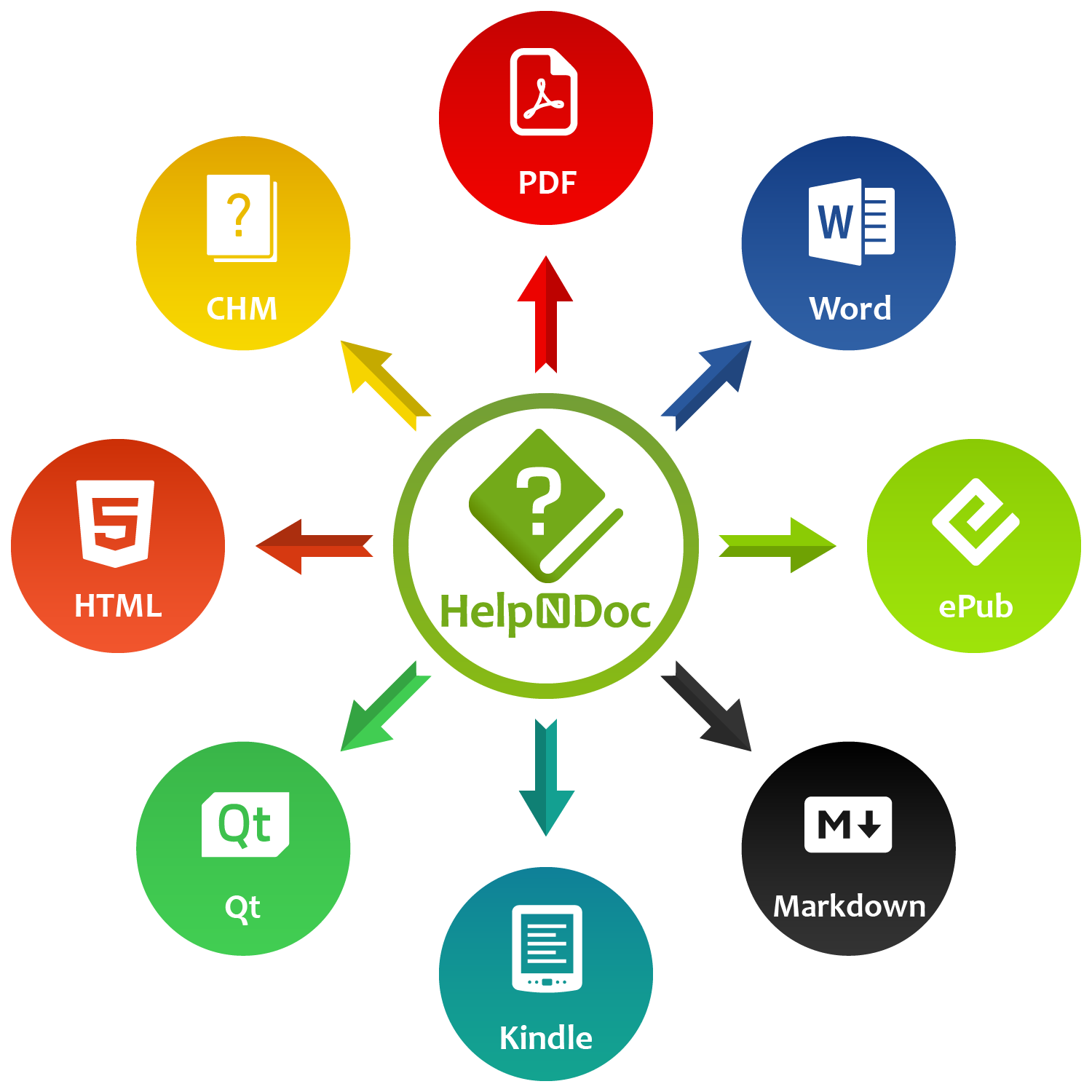
Rather than maintaining separate projects for each format, HelpNDoc lets you write and organize your content once, then generate multiple outputs from the same source project. These include PDF, ePub, CHM, HTML, Word, Kindle, Qt Help, and Markdown.
This single-source approach saves time and reduces errors. When you update a topic, correct a typo, add an image, or reorganize your content, you only have to do it once. HelpNDoc can then regenerate the formats you need from that same project.
Even better, HelpNDoc includes a template engine for every supported output format. That means you can customize the appearance and behavior of your PDF output separately from your ePub output, while still keeping the actual content centralized.
You can create a precise, print-ready PDF for users who need structure and permanence, and a flexible ePub version for readers who want comfort and portability. Both come from the same project. Both stay consistent. Each serves a different reading need.
✅ The Best Format Is the One That Serves the Reader
PDF and ePub are not competing formats. They are complementary publishing options.
![HelpNDoc ePub and PDF generator [helpndoc-generator]](/news-and-articles/2026-05-12-epub-vs-pdf-choosing-the-right-format-for-your-content/images/helpndoc-epub-pdf.jpg)
PDF provides readers with a stable, professional document that can be printed, archived, and referenced, while ePub offers a flexible, comfortable reading experience on phones, tablets, and eReaders.
For writers, teachers, trainers, content authors, businesses, and documentation teams, the smartest strategy is often to provide both formats.
With HelpNDoc, you do not need to duplicate your work or maintain separate versions of the same content. Create your project once, customize each output with templates, and generate PDF and ePub versions whenever you need them.
Ready to try it yourself? Download HelpNDoc for free today and start publishing your content in multiple formats from a single source project.
Want to create great documentation?
HelpNDoc is free, fully functional, and easy to use.
Produce your first multi-format documentation in the next minute or so.