
Analyzing the generation matrix of a topic
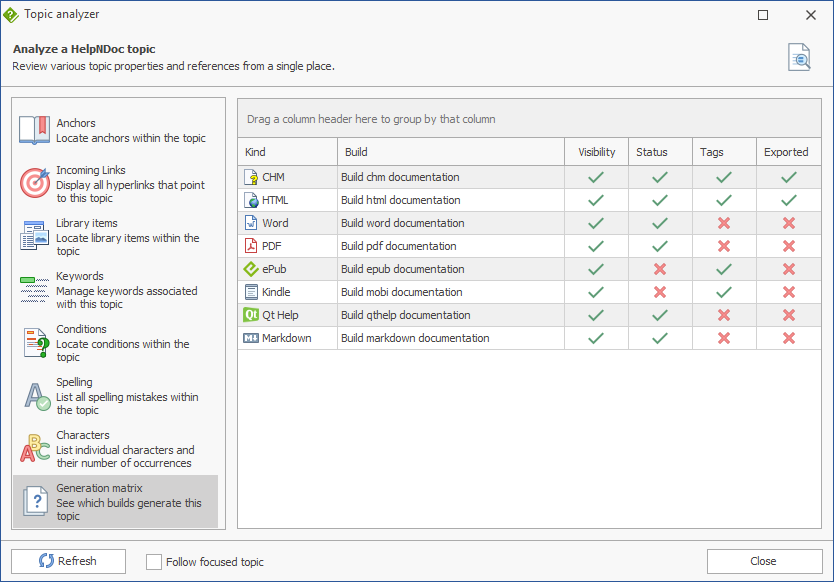
The Generation Matrix Analyzer provides a clear overview of how the selected topic participates in every documentation build defined in the current project. It allows you to quickly determine whether a topic is included in each output format and, when it is excluded, identify the reason why. The analyzer also evaluates all parent topics, making it easy to identify inherited conditions that prevent a topic from being generated.
Overview
The Generation Matrix Analyzer displays one row for each build available in the current project and provides the following information:
- Kind: The output format of the build (for example, CHM, HTML, PDF, Word, ePub, Kindle, Qt Help, or Markdown).
- Build: The name of the build configuration.
- Visibility: Indicates whether the topic is visible. A hidden topic, or a hidden parent topic, prevents the topic from being generated.
- Status: Shows whether the topic's status is included in the selected build. The status of parent topics is also taken into account.
- Tags: Indicates whether the topic's tags satisfy the build's inclusion and exclusion rules. Parent topic tag rules are also evaluated.
- Exported: Shows whether the topic will be included in the corresponding build after all generation rules have been evaluated.
A green check mark indicates that the corresponding condition is satisfied, while a red cross indicates that the condition prevents the topic from being generated.
Understanding the Generation Matrix
The Exported column represents the final result of the generation process for each build. A topic is exported only if all generation requirements are met for both the topic itself and every one of its parent topics.
The analyzer evaluates the following criteria:
- Visibility: The topic and all of its parent topics must be visible.
- Status: The topic's status, and the status of every parent topic, must be included in the selected build.
- Tags: The topic's tags, as well as those inherited from its parent hierarchy, must satisfy the build's tag filtering rules.
If any of these conditions is not met, the topic will not be generated for that build. The corresponding column displays a red cross, allowing you to immediately identify which rule is preventing the topic from being included.
Tooltips
Hover the mouse pointer over any green check mark or red cross to display a detailed explanation of the evaluation result.
For failed conditions, the tooltip identifies both the reason the topic is excluded and whether the condition originates from the selected topic itself or from one of its parent topics. When a parent topic is responsible, the tooltip displays the name of the parent so you can quickly locate and correct the source of the exclusion.